Learning in Public
The course encourages sharing your journey publicly. For each module, share what you learned on:
- X (Twitter)
- Medium
- BlueSky
- Other platforms
Why Learn in Public?
We want to motivate you to share what you learn in public. As Alexey Grigorev explains in his Substack post, learning in public brings multiple benefits:
- Reinforcement - Teaching others helps you learn more deeply
- Accountability - Public commitment keeps you consistent
- Feedback - Others can correct your misunderstandings
- Networking - Connect with like-minded people
- Portfolio - Build a visible track record of your skills
- Opportunities - Jobs and collaborations can find you
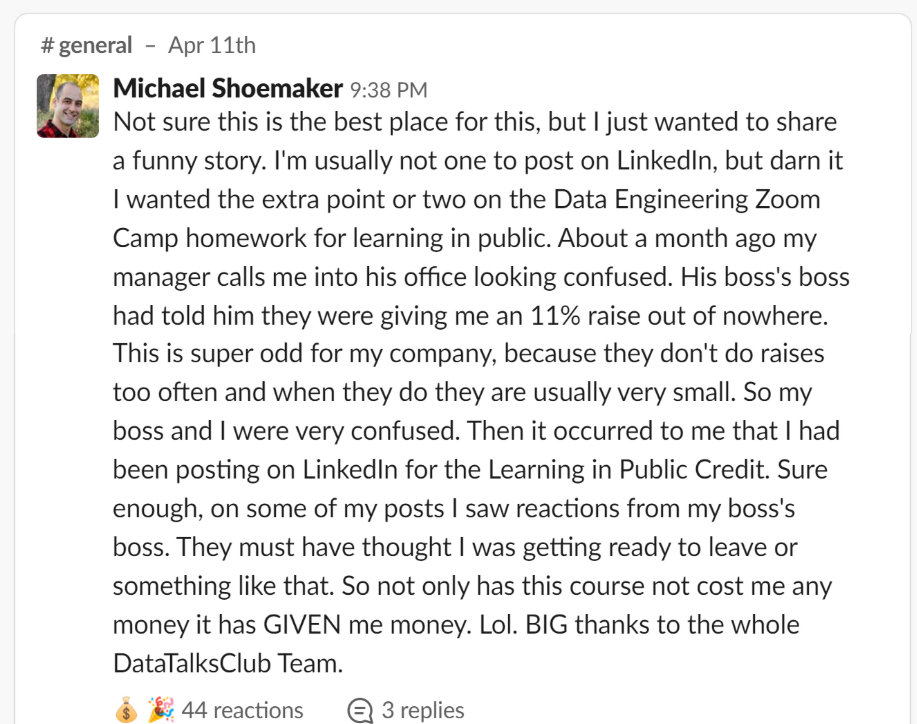
“This course not only costs nothing - it can actually make you money.” Michael shared his homework on LinkedIn for learning in public credit. The result? An 11% raise.
How to Do It for This Course
Share your progress:
- Complete a unit, a module or homework assignment
- Write a short post about what you learned
- Include the course hashtag (
#dezoomcamp) - Submit your post link through the course platform to earn leaderboard points
Submit your post links through the course platform when completing homework, projects, or peer reviews. Each link earns you 1 extra point on the leaderboard. See the learning in public platform guide for details on link limits, valid links, and submission mechanics.
Only submit links to your own social media posts about the course. Submitting unrelated links - documentation pages, random articles, other people’s content - will result in losing all learning in public points and having this feature permanently disabled. If you see someone misusing the system, report it in the course Slack channel.
Why Extra Points?
We know sharing your learning publicly can feel uncomfortable. You might worry about making mistakes or being judged. These feelings are completely normal.
The leaderboard points will give you that extra push. Many students from previous cohorts were reluctant at first, but thankful afterward for the motivation to start sharing.
This is totally optional. The leaderboard is just for fun. You can completely ignore it and still get everything you need from this course. The main goal is for you to learn data engineering. If you also choose to share your journey publicly, we’ll be happy - but the choice is yours.
What to Share
- Your data pipeline projects (screenshots, GitHub links)
- Insights from each module (Docker, Terraform, dbt, Spark, etc.)
- Challenges you faced and how you solved them
- Dashboard visualizations you created
- Time spent vs results achieved
Templates to Get You Started
Each homework assignment includes example posts you can use as templates. This is the template for homework 1.
Templates are helpful to get started, but the most engaging posts are personal and authentic. Here’s how to make your posts stand out:
Tell a story:
- Why you’re taking this course
- A challenge you overcame
- How this new skill connects to your career
Add your unique perspective:
- Share what surprised you or what you found difficult
- Explain a concept in your own words
- Connect what you learned to your background or goals
- Document your debugging process
Show, don’t tell:
- Include screenshots of your work (pipelines, dashboards, code)
- Record a quick video showing your project in action
Use built-in tools to capture short clips:
- Windows: Snipping Tool
- Mac: Cmd + Shift + 5 for screen recording
- Linux: SimpleScreenRecorder
A 30-second video walking through your pipeline or dashboard can be more engaging than a long text post.
Engage with others:
- Ask questions to spark discussion
- Tag classmates who are also learning
- Share resources you found helpful
Real Examples from Alexey Grigorev
Actual learning in public posts from Alexey’s Agents Crash Course (different course, same approach):