Project Submission
Submit your final capstone project through the course management platform and review your peers’ projects.
Project Attempts
For most courses, you need to complete one project and you get two attempts:
- Data Engineering Zoomcamp - 1 project, 2 attempts
- MLOps Zoomcamp - 1 project, 2 attempts
- LLM Zoomcamp - 1 project, 2 attempts
- ML Zoomcamp - 2 projects, 3 attempts (you must complete 2 out of 3)
You only need to use one attempt. If you fail the first attempt, you still have a second chance. The second attempt also provides flexibility if you started the course late or are still catching up with the modules.
If you have extra time, you can submit different projects for both attempts and earn points for each - but they must be different projects. You cannot submit the same project twice.
Project Gallery
The projects page displays a gallery of student projects from your cohort. Each project card shows:
- Project title and description
- Author name
- Number of peer reviews completed
- Links to view the full project
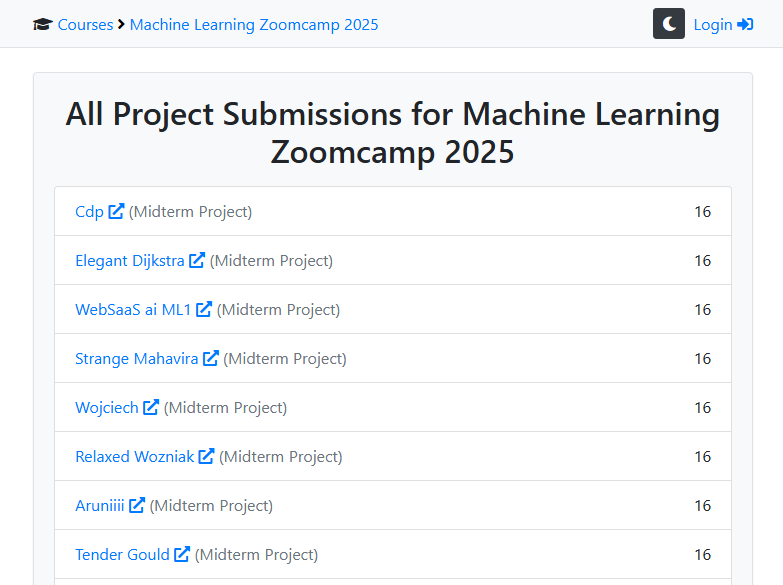
Browse projects from previous cohorts for inspiration:
- ML Zoomcamp 2025 projects
- Data Engineering Zoomcamp 2025 projects
- Data Engineering Zoomcamp 2024 projects
Project Submission
When your project is ready, submit it through the platform.
Submission Fields
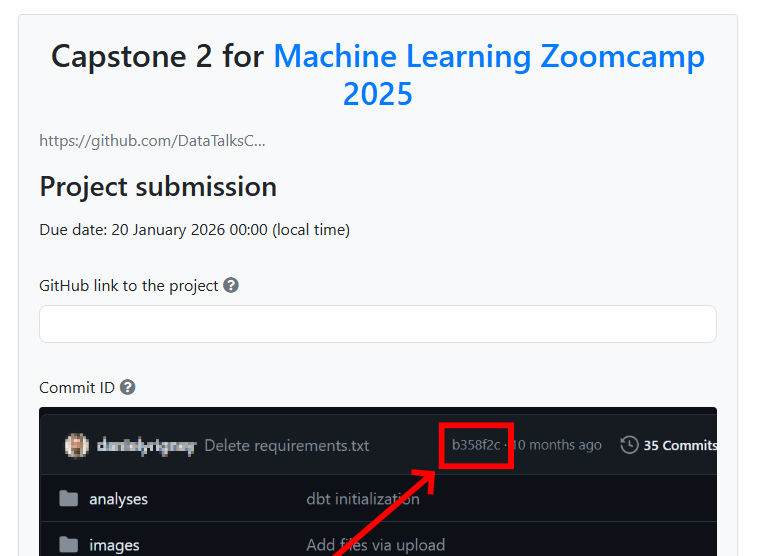
The project submission form includes:
- GitHub link - URL to your project repository
- Commit ID - The specific commit hash for your submission
- Learning in public links - Links to your social media posts about the project (optional)
- Time spent on project - Number of hours invested
- FAQ contribution - Share insights for the course FAQ (optional)
- Certificate name - Name to appear on your certificate
Certificate Name vs Display Name
Your certificate name and display name are separate. The display name appears on the leaderboard - you can keep it anonymous if you prefer. The certificate name is what will be printed on your certificate. Make sure to set your certificate name before submitting - otherwise, you may end up with a placeholder instead of your real name.
Tips
- Submit before the deadline even if your project isn’t perfect
- Make sure your GitHub repository is public
- Use a specific commit ID (first seven characters of the commit hash) to match what reviewers will see
- If you keep committing after submission, update the commit ID in the form
- Share your work publicly to earn extra points
Peer Review
After submitting, you’ll review 3 projects from your cohort. This is mandatory to complete the project.
See the peer review guide for details on the evaluation process.
Through peer review, you:
- Learn from different approaches
- See how others solved similar problems
- Contribute back to the community
- Earn extra points for each review
Click on any project card to view details and submit your evaluation.
Checking a Specific Commit on GitHub
When reviewing, you need to evaluate the project at the exact commit the author submitted. To see the repository at that commit, use this URL pattern:
https://github.com/user/repo/tree/COMMIT_ID
The author may have continued pushing changes after submission, but you should evaluate using the commit ID they provided.
To clone and run the project at that commit locally, clone the repository and then run git checkout COMMIT_ID.
Reproducing Peer Projects
Try to reproduce the projects you review - clone them, run the code, deploy if possible. This is a great opportunity to learn from different approaches. However, sometimes full reproduction is not possible (for example, you might need cloud credentials you don’t have). Use your own judgment on how thorough your review is. You can evaluate all the criteria without running the code, but running it helps you learn more.
Plagiarism
Plagiarism is not permitted. You must not copy the work of others and present it as your own. If you notice plagiarism while reviewing a peer’s project, give them zero points for everything and note it in the review comments.
Self-plagiarism is also not allowed:
- You cannot reuse a project from another course without changes
- If you passed project attempt one, you cannot submit the same project as attempt two - even if you improved it - because you would get double the points
- If you failed attempt one, you can improve and resubmit for attempt two
Past Office Hours
For courses that have been running for some time, past office hours recordings contain useful information about projects. Typically, the last office hours of a cohort focus on project-related questions. Check the course playlist for these recordings.