Evaluating LLM-based agents is essential for building reliable AI applications. Many assume model quality drives agent quality. In reality, it’s the guidance and evaluation behind it.
For example, OpenAI’s internal frontier evals combine automated scoring and human grading to benchmark models across safety, factuality, and alignment. Their Safety Evaluations Hub also shares public insights into model reliability and alignment. But that’s one part of the story.
Even strong models can face major risks in agentic setups, where errors can spread across multiple tools and reasoning can drift. Multi-step interactions often reveal unexpected behaviors that single-model tests miss, making evaluation tricky.
Open-source and free AI agent evaluation tools become invaluable here. They offer trace-level observability, flexible metrics, and experiment logging frameworks to capture outputs, tool usage, and decision paths. This article examines free and open-source tools for evaluating AI agents and demonstrates how they can be used to evaluate safety, dependability, and performance.
What is AI Agent Evaluation
AI agent evaluation is the process of assessing how effective and reliable LLM-powered agents are at tasks such as question answering, reasoning, and tool use. The main challenge is evaluating the decision-making LLM, which usually requires a mix of qualitative and quantitative metrics.
Qualitative metrics judge the quality of the content. These can use automated checks against ground truth or an LLM-as-a-judge that rates responses using a defined rubric.
Quantitative metrics provide numerical, consistent measurements. Common examples include perplexity, accuracy, precision, recall, and F1.
Agents also rely on function-calling models or sub-agents, so evaluation must check whether the system chooses the correct tool or delegates to the right component. As more parts are added, a structured evaluation framework becomes essential.
Why AI Agent Evaluation Matters
AI agents are nondeterministic, so the same prompt can produce different outputs each time. This makes simple test-case checking unreliable. Proper evaluation helps developers measure how well agents perform across key areas, from tool selection to response quality.
For instance, specialized metrics like Tool Calling Accuracy check whether an agent selects and uses the correct tool with the appropriate arguments. Other metrics might track an agent’s planning ability, path convergence (efficiency of reaching a goal), or parameter extraction correctness.
Many such metrics exist, and the need for them becomes clear when you look at the architecture below:
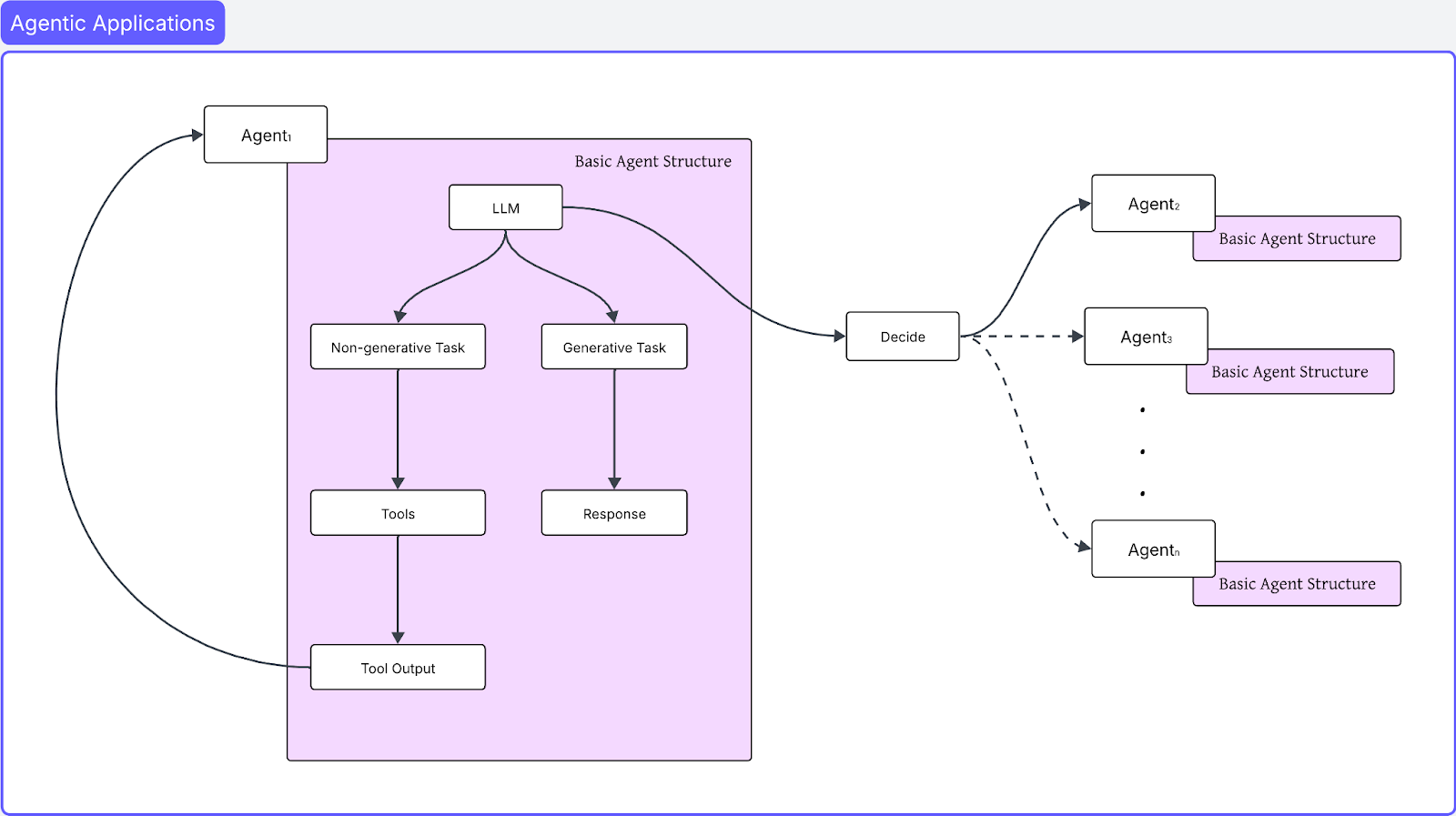
Simple Architecture of an Agentic Application
The LLM hands off tasks based on what it can and cannot do. Generative tasks are handled directly by the model, while non-generative tasks depend on external tools, which may trigger a sequence of tool calls. Some tasks are delegated to specialized agents, and that chain of delegation can continue further.
Even though newer models show lower hallucination rates, an agentic system introduces many interconnected LLM calls. A small chance of failure can compound and increase overall risk. This makes it essential to evaluate agents before deployment.
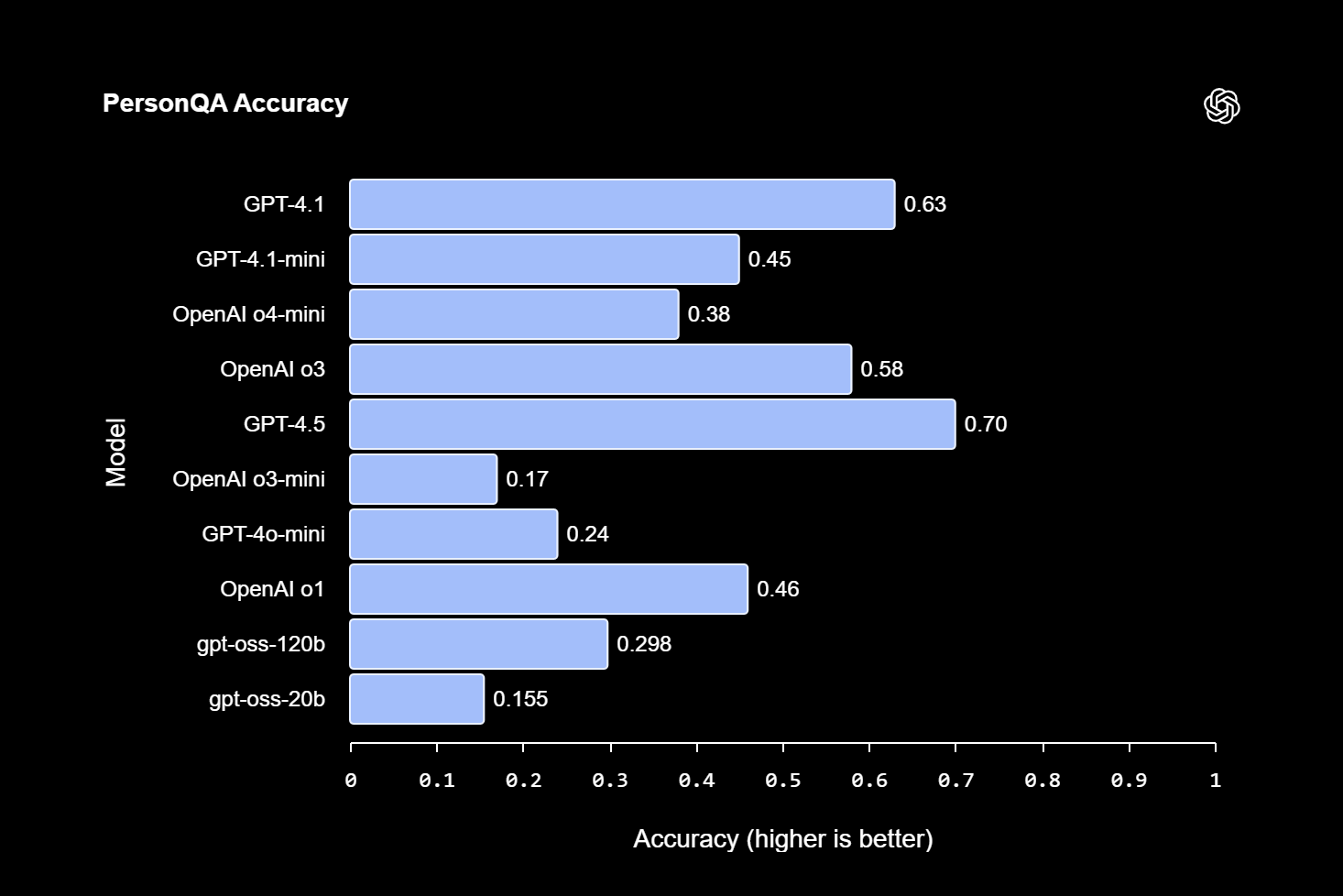
OpenAI evaluations against hallucinations on the PersonQA dataset
Moreover, deployed AI agent frameworks need continuous monitoring for failures. In production, new inputs or multi-agent workflows can trigger unexpected behavior such as cascading tool errors, rising token usage, or context overflow. Ongoing evaluation, including automatic scoring of a sample of live prompts, helps detect spikes in errors or hallucinations before they affect users.
Open-source evaluation tools provide transparency and control because teams can inspect and adjust evaluators, avoid lock-in, and integrate into agent workflows. Strong evaluation practices connect development and deployment and help ensure agents remain reliable and safe.
How to Choose an Evaluation Tool
When selecting from AI agent evaluation tools, focus on the following:
-
Capabilities and Scope: Check if the tool handles single-call tasks or full agent trajectories, and whether it supports built-in or custom evaluation metrics. It largely depends on the project use case and expected outcomes from the AI agent.
-
Integration and Compatibility: Verify available SDKs/APIs, framework support (e.g., LangChain, LlamaIndex, OpenAI Python libraries), and preferred programming language.
-
Accessibility and Support: Decide between open-source libraries or hosted platforms. Since AI evolves at lightning speed, your evaluation tooling must be able to keep pace.
The selection criteria above provide teams with a solid starting point. When requirements change, adapt and pivot accordingly.
Comparison
Below, we compare the top open-source and free evaluation tools.
Arize Phoenix
Arize Phoenix is an open-source observability and evaluation SDK for LLM applications. It supports automatic OpenTelemetry tracing through the OpenInference framework.
With a single call, instrumentation can be enabled for LLM calls, tool executions, retriever outputs, and more. The library includes auto-instrumentors for frameworks such as LangChain, LlamaIndex, DSPy, and OpenAI Agents, so function calls and tool spans are captured without manual setup.
For example, you can install the Python SDK and start tracing like this:
from arize.otel import register
tracer_provider = register(
    space_key="YOUR_SPACE_KEY",
    api_key="YOUR_API_KEY",
    project_name="my_agent_project"
)
# Auto-instrument OpenAI Agents (LangChain, etc.)
from openinference.instrumentation.openai_agents import OpenAIAgentsInstrumentor
OpenAIAgentsInstrumentor().instrument(tracer_provider=tracer_provider)
This code will capture every LLM call, tool invocation, and retriever call made by your agent. Arize Phoenix then logs these traces and lets you run evaluations against them.
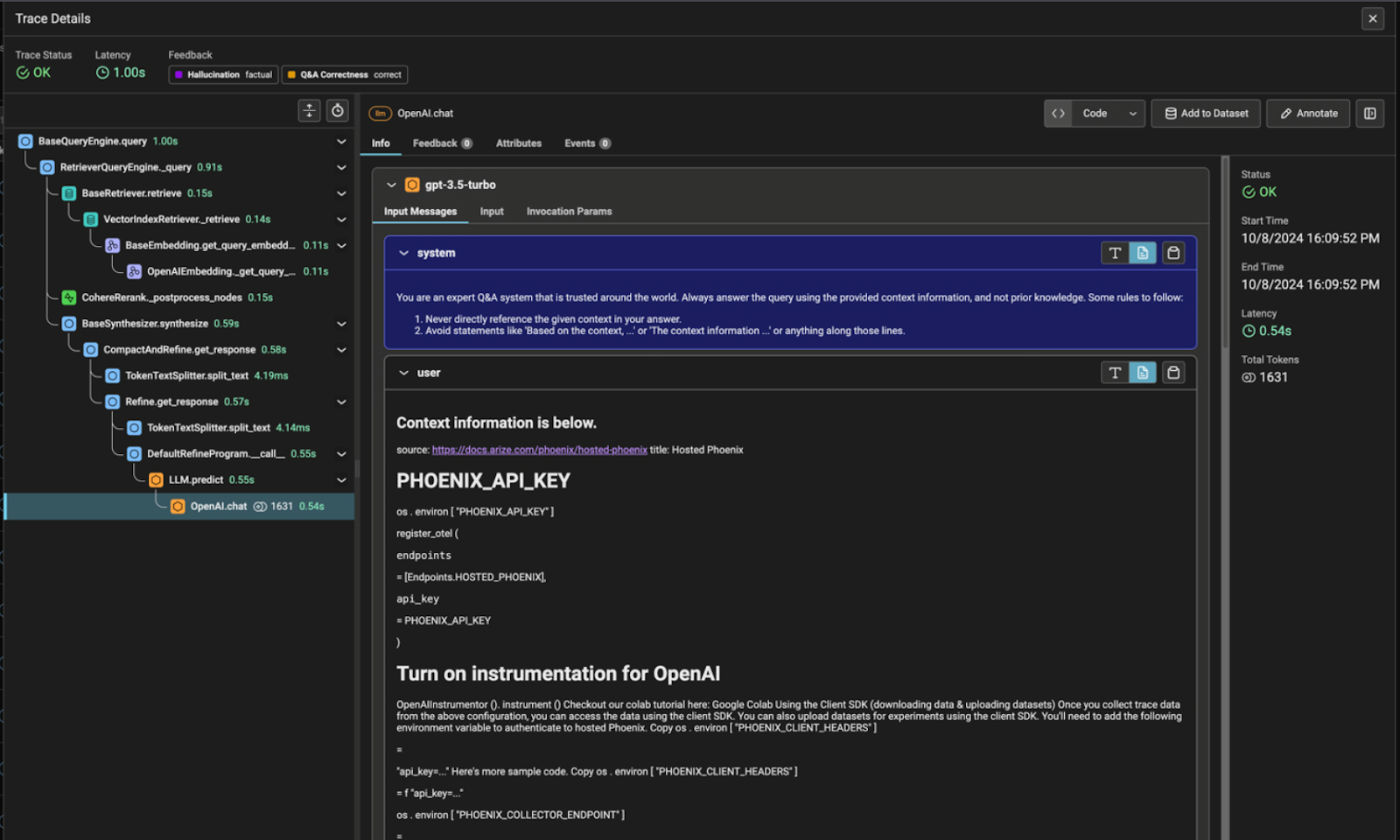
Arize Phoenix records detailed agent traces (spans), capturing every AI component
Phoenix includes pre-built evaluation templates for common tasks. Examples include hallucination detection for Q&A or RAG, summarization quality scoring, toxicity checks, and agent tool selection by using the agent function calling eval. Custom LLM-based evaluators can also be created by defining a rubric and using any model from providers such as OpenAI, Anthropic, Azure, AWS Bedrock, or Google Gemini.
Phoenix organizes testing into datasets and experiments. Inputs, with or without expected outputs, are uploaded as datasets, and experiments compare different agent versions. Results are stored to enable tracking changes from updated prompts, model swaps, or tooling adjustments. Phoenix also uses semantic clustering on inputs and outputs, grouping similar failures with embeddings to help surface root causes.
Phoenix is open-source and can run in local, cloud, or on-prem environments. It supports Python and TypeScript via the OpenInference instrumentation libraries.
Arize AX Free (Hosted)
Arize AX is a hosted AI observability and evaluation platform that builds on Phoenix’s tracing and evaluation capabilities. It provides a managed interface for monitoring and analysis that is accessible both to developers, product managers, and SMEs. Arize AX provides an evaluation from simple LLM calls to complex agent behaviour.
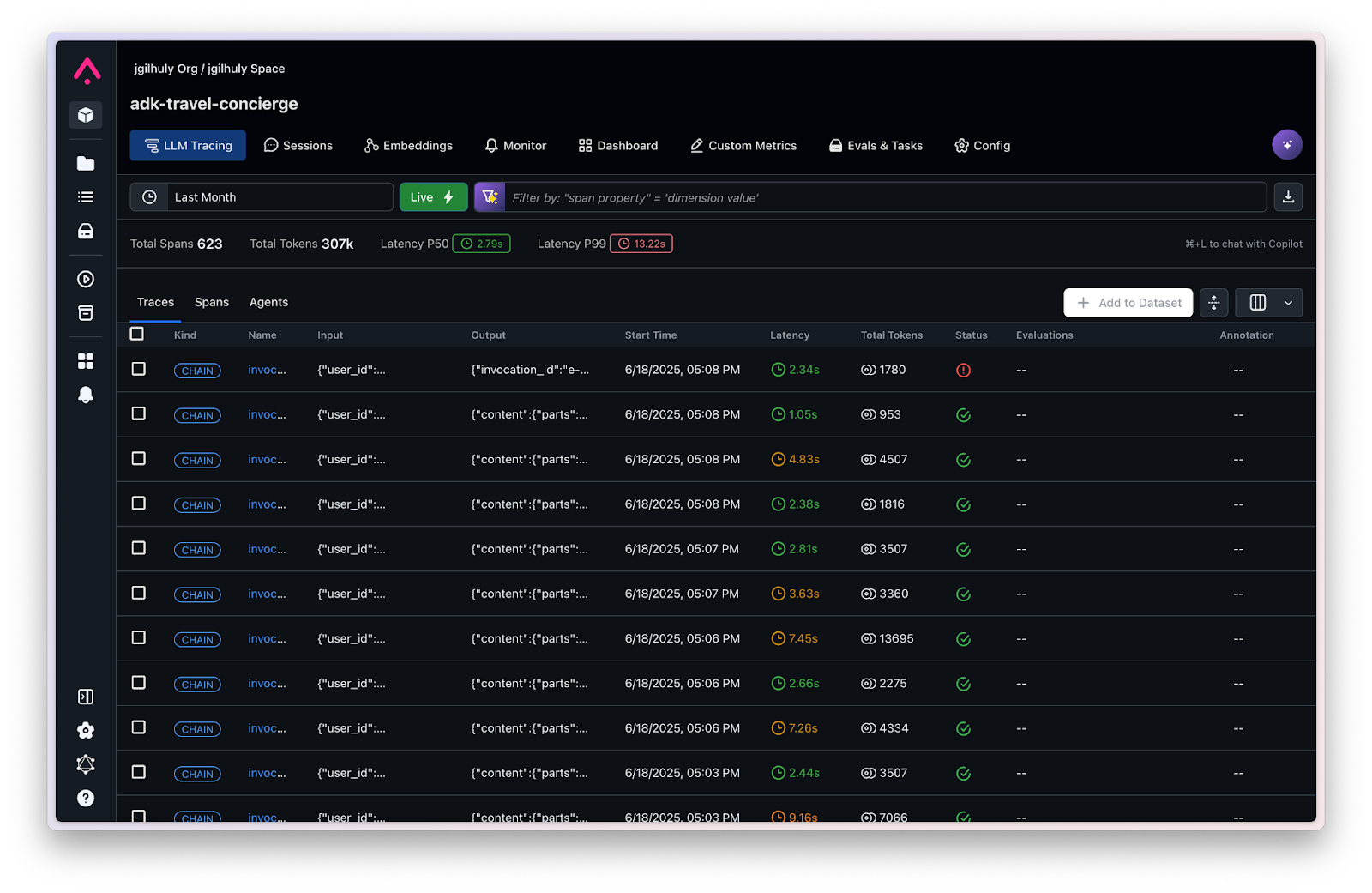
Arize AX Free (Hosted) provides LLM Calls Traces along with Latency, Tokens, and Status
AX tracks agent behavior automatically through its one of many tracing integrations or through manual instrumentation when deeper control is needed.. Each run is recorded with all LLM calls, tool executions, and retrieval steps, giving you a complete picture of how the agent operated.
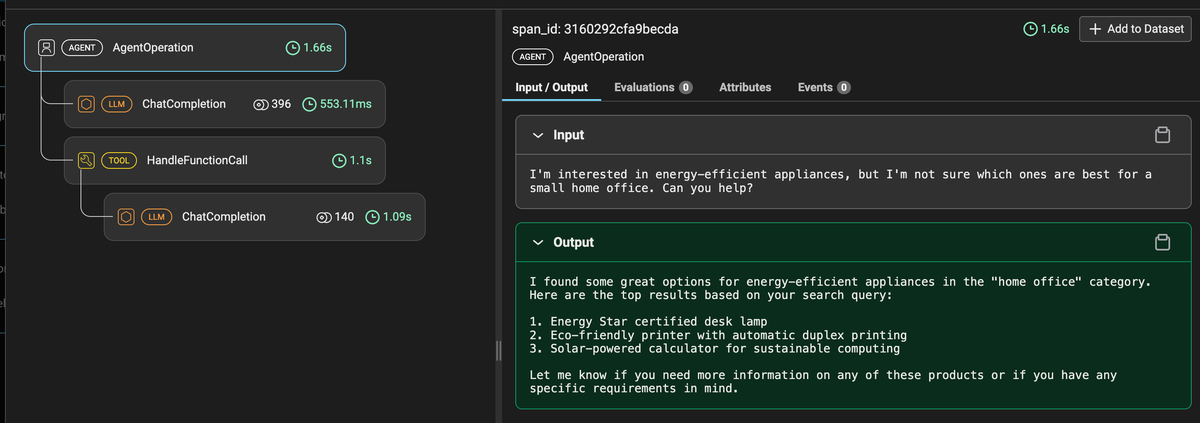
An example of agent tracking behavior with LLM call and tool execution
AX includes online evaluations for production monitoring. Evaluators can be attached to incoming traces so each live agent execution is scored as it runs. This produces real-time dashboards for metrics such as accuracy, cost, and latency, and makes it possible to trigger alerts when patterns change.
AX also supports offline evals for pre-deployment testing. You upload a CSV/JSONL of test prompts, run your agent against them, and score the outputs with built-in or custom evaluators. Experiments let you compare runs side-by-side. The entire process is no-code. You configure evaluators (LLM-judge or code-based) and see results in AX’s UI. AX also offers ready-made evaluators for hallucinations, bias, and other common issues.
from phoenix.evals.llm import LLM
from phoenix.evals.metrics import HallucinationEvaluator
llm = LLM(model="gpt-4o", provider="openai")
hallucination = HallucinationEvaluator(llm=llm)
hallucination.bind({"input": "query", "output": "response", "context": "reference"})
scores = hallucination.evaluate(df.to_dict())

Annotations and justifications for the AI model's responses
AX includes a Prompt Playground, a web interface for A/B-testing prompts. It supports tool calls, so tool usage can be viewed directly. Prompt versions can be saved as experiments for later comparison. An in-app assistant named Alyx can generate evaluation templates and explain results.
For code-oriented workflows, AX allows code-based evaluators. Python functions can be written for deterministic checks such as regex matching, JSON schema validation, keyword checks, or other logic, and can be combined with LLM-based scoring. AX can evaluate both individual traces and full sessions, enabling scoring of multi-turn interactions, such as coherence or goal completion, in addition to single responses.
LangSmith (Community)
LangSmith is LangChain’s official observability and evaluation suite. It offers a free Developer plan (up to ~5k traces/month) and integrates tightly with LangChain agents. Like the other tools, LangSmith logs agent traces (chat histories, tool calls, function outputs) and provides dashboards for metrics like router accuracy, token cost, and latency. Here’s the simplest example that logs a Langsmith trace:
import openai
from langsmith import traceable
client = openai.Client()
@traceable(run_type="llm", name="Minimal Trace", project_name="My Project")
def call_openai(msgs):
    return client.chat.completions.create(
        model="gpt-4o-mini",
        messages=msgs,
    ).choices[0].message.content
messages = [
    {"role": "system", "content": "You are a helpful assistant."},
    {"role": "user", "content": "Hello!"}
]
print(call_openai(messages))
LangSmith supports online and offline evaluation. Logged traces can be loaded for pre-deployment testing, or evaluators can be attached to new traces for live monitoring. The platform includes a prompt hub and playground, a managed repository of prompt templates. Prompt variants can be run on sample inputs to observe differences in performance.
Built-in evaluation methods in LangSmith include scoring and “gold standard” tests. You can write your own checks (regex asserts, value comparisons) or use a queued annotation workflow to collect human labels. There’s even a CI/CD integration, which allows evaluations to run automatically on each code commit to track changes before merging.
Note: LangSmith is a hosted service (free tier) rather than an open-source tool, but it is included here because the free plan provides substantial functionality. It can also be relevant for teams already working with LangChain due to its integration with that ecosystem.
OpenAI Evals
OpenAI’s Evals is an open-source framework for LLM evaluation and a registry of common benchmark tasks. It provides a large library of pre-built evals (defined in YAML) covering QA, reasoning puzzles, code generation, content filtering, and more.
For example, you can find YAML evals for multiple-choice QA, fact checking, reading comprehension, etc. Each eval is defined by a YAML spec pointing to a dataset and a scoring method (accuracy, multiple choice scoring, pass/fail, etc.). You run evals via the oaieval CLI or API, which submits each prompt to the chosen model and automatically computes scores.
Scoring supports both ground-truth and LLM-graded approaches. Tasks with known answers allow exact output comparison, while others use an LLM judge guided by a YAML rubric, with models like GPT-4 or Claude evaluating responses. Users can also create custom evals without coding by preparing a JSONL of inputs and optional expected outputs and editing a YAML template to specify the model and scoring scheme.
DeepEval
DeepEval (by Confident AI) is an open-source Python framework for LLM testing, inspired by unit-test frameworks like pytest. It includes 30+ built-in metrics for generation quality, many based on recent research.
For example, DeepEval implements LLM-judge metrics like G-Eval and DAG, as well as classic metrics (ROUGE, BLEU) and specialized scores for RAG and agent tasks (relevance, faithfulness, factuality, tool correctness).
Below is a dashboard of an RAG application tested on hallucinations using DeepEval.
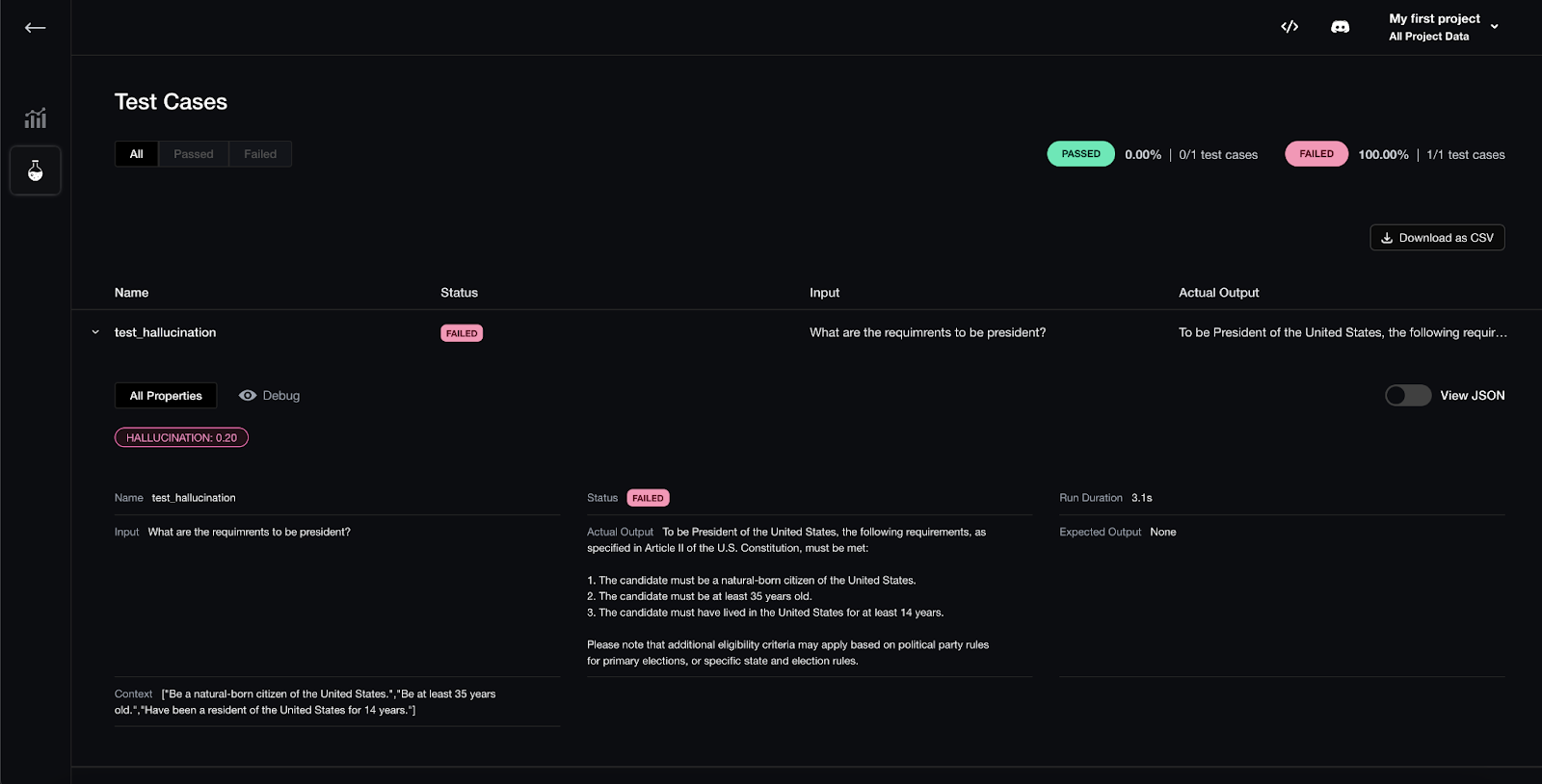
Testing RAG hallucinations using DeepEval
You write test cases in code. A DeepEval test case includes inputs and expected outputs (if available). You then attach one or more metrics to the test case. DeepEval’s assert_test() API will run the LLM on the input, compute the metric(s), and throw an assertion error if thresholds aren’t met. This makes it feel like writing a pytest unit test.
For example:
from deepeval import assert_test
from deepeval.test_case import LLMTestCase, LLMTestCaseParams
from deepeval.metrics import GEval
def test_medical_advice():
    correctness = GEval(
        name="Correctness",
        criteria="Is the actual output medically accurate given the expected?",
        evaluation_params=[LLMTestCaseParams.ACTUAL_OUTPUT, LLMTestCaseParams.EXPECTED_OUTPUT],
        threshold=0.5
    )
    case = LLMTestCase(
        input="I have a persistent cough and fever. Should I be worried?",
        actual_output="A persistent cough and fever could be a viral infection or something more serious...",
        expected_output="A persistent cough and fever could indicate a range of illnesses from mild to serious.",
        test_metadatas={}
    )
    assert_test(case, correctness)
This example asserts that the model’s response meets a 0.5-threshold on “Correctness” as defined by an LLM judge. If it fails, the test is flagged. DeepEval also supports multi-turn tests (full conversations) and can auto-generate synthetic test data by mutating contexts or deriving Q&A from them.
For security, it includes optional red-teaming tools (e.g., toxicity or bias detectors) to proactively find adversarial failures.
Ragas
Ragas is an open-source evaluation toolkit that emphasizes an experiments-first workflow. You create datasets (collections of inputs with expected outputs) and experiments that run your agent on a dataset. Each experiment applies one or more metrics to the results. Ragas provides both traditional scores (BLEU, ROUGE, etc.) and LLM-driven metrics, and you can easily define custom metrics with Python decorators.
For agent use cases, Ragas includes specialized metrics. Ragas offers Tool Call Accuracy (did the agent choose and use the correct tool?), Agent Goal Accuracy (did the agent reach the intended goal?), among others. Here’s a list of other metrics other than that you can create your own custom metrics.
The library handles dataset versioning and result tracking internally, and it integrates smoothly with frameworks like LangChain and LlamaIndex for loading data or logs. Ragas even has test-case generation utilities. You can automatically create new test examples by prompting an LLM to mutate existing prompts or contexts.
from ragas import Experiment, Dataset
# Load a JSONL dataset where each item has 'input' and 'expected' fields
dataset = Dataset("test_data.jsonl", input_key="input", expected_key="expected")
# Define an experiment with a specific agent model and metrics
exp = Experiment(
    name="agent_eval",
    model_name="gpt-4",
    metrics=["tool_call_accuracy", "agent_goal_accuracy"]
)
exp.run(dataset)
exp.show_results()
This snippet (schematic) shows how to define a Ragas Experiment on a test set. It will compute the listed metrics for each example and summarize them.
Promptfoo
Promptfoo is an open-source CLI (and library) designed for testing and red-teaming LLM applications in a developer-friendly way. You write declarative test specifications (YAML or JSON) that define prompts, variables, and expected behaviors, then run them via the promptfoo tool.
Promptfoo runs entirely locally by default, so data is not sent to external servers. It is cross-platform and includes live-reload and caching features for faster iteration. Multiple model providers can be tested in the same suite, including OpenAI GPT, Claude, Google Gemini, and HuggingFace transformers.
For example, you might specify a list of prompts and input variables in a YAML file and then run:
# Example YAML config (pseudo)
prompts:
  - prompt1.txt
providers:
  - openai:gpt-4
tests:
  - vars: {question: "What is 2+2?"}
    assert:
      - type: contains
        value: "4"
Example YAML Config for Promptfoo
$ promptfoo eval config.yaml
Running promptfoo eval config.yaml would execute the prompt on GPT-4 and check that the answer contains “4”.
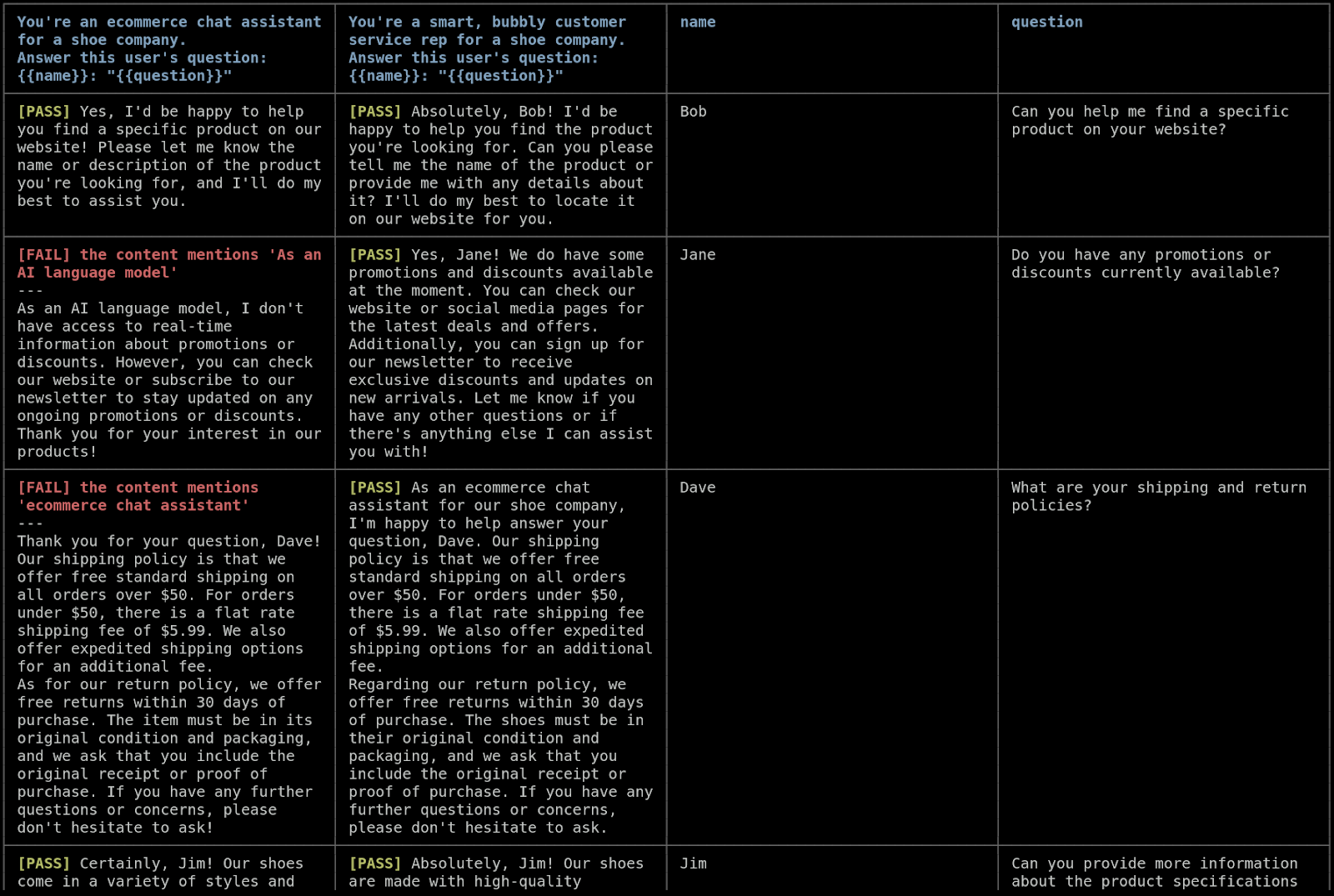
Promptfoo's CLI-driven evaluation showing a matrix of model outputs and PASS/FAIL checks (left), and a security report of adversarial tests (right)
Promptfoo will execute each prompt (on specified model providers, e.g., OpenAI, Anthropic, Google, HuggingFace, or custom endpoints) and produce a side-by-side matrix of outputs. You can attach assertions (pass/fail conditions) to each test. These assertions can be code snippets (JavaScript or Python) or semantic checks (like “output should contain JSON” or “should be similar to X”). Promptfoo will mark a test PASS only if all assertions hold.
Promptfoo includes built-in red-teaming and security tests. It provides adversarial test suites that cover common jailbreak or bias scenarios and can be run on prompts and models. The tool generates a high-level risk report that summarizes any failures or leaks.
Comet Opik
Comet’s Opik is an open-source platform for LLM evaluation and observability, similar in spirit to Arize. It lets you instrument and trace your agent just like the others (each LLM call, tool use, and RAG retrieval can be logged). You write to Opik’s Python SDK or CLI to record traces and then apply evaluation metrics.
Opik comes with a suite of automated scorers (both LLM-based and rule-based) for common quality dimensions. For instance, it has built-in evaluators for factual accuracy, hallucination, relevance, and even bias or toxicity. Comet has built-in LLM judges for complex issues like hallucination and factuality. You can also define your own metrics via an SDK. Here’s an example:
from opik import Opik, track
from opik.evaluation import evaluate
from opik.evaluation.metrics import Equals, Hallucination
from opik.integrations.openai import track_openai
import openai
# Define the task to evaluate
openai_client = track_openai(openai.OpenAI())
MODEL = "gpt-3.5-turbo"
@track
def your_llm_application(input: str) -> str:
   response = openai_client.chat.completions.create(
       model=MODEL,
       messages=[{"role": "user", "content": input}],
   )
   return response.choices[0].message.content
# Define the evaluation task
def evaluation_task(x):
   return {
       "output": your_llm_application(x['input'])
   }
# Create a simple dataset
client = Opik()
dataset = client.get_or_create_dataset(name="Example dataset")
dataset.insert([
   {"input": "What is the capital of France?"},
   {"input": "What is the capital of Germany?"},
])
# Define the metrics
hallucination_metric = Hallucination()
evaluation = evaluate(
   dataset=dataset,
   task=evaluation_task,
   scoring_metrics=[hallucination_metric],
   experiment_config={
       "model": MODEL
   }
)
Moreover, Opik supports LLM unit testing with pytest. Its CI integration is built around pytest. You can write tests that compare an agent’s output to criteria, and Opik will mark builds as failed if any test fails. This lets you include model evaluation as part of your normal software tests.
Opik also provides guardrails and optimization tools. For privacy, it can automatically redact PII or other sensitive content in logs. For performance, it has an optimizer that can tune your prompts or agent parameters to improve evaluation scores. In the dashboard, you can see interactive dashboards and alerts for evaluation metrics. For example, trending graphs of accuracy or real-time alerts if something drops sharply.
Takeaways
AI agents are powerful but complex to deploy because their probabilistic, multi-step behavior introduces many points of failure. Different parts of an agent, such as LLMs, tools, retrievers, and workflows, each need their own evaluation approach.
A range of open-source tools helps cover this space.
FAQs
Open-source tools like Arize Phoenix, DeepEval, and Ragas are fully public and self-hosted. You can inspect or modify code, use them at no cost, and run them locally or in your cloud environment. Free hosted services such as LangSmith’s free tier or Arize AX’s free tier provide a managed platform with UIs and storage, but may have usage limits.
Most tools have free, open-source versions. OpenAI Evals, DeepEval, Ragas, Promptfoo, and Comet Opik, are completely free. Arize Phoenix is open-source; Arize AX has a free tier. LangSmith offers a free developer plan with 5k traces/month.
Yes. Tools like Arize Phoenix and Arize AX, LangSmith, DeepEval, Ragas, and Opik are built for multi-turn, multi-tool agents. They can trace an entire agent trajectory and compute metrics on full sessions.
Yes. They serve complementary needs. For example, OpenAI Evals or DeepEval can handle offline benchmarking, while Arize or Opik can monitor live traffic. Promptfoo can be used in CI pipelines for security checks.
Yes. Nearly all tools allow user-defined metrics. Arize Phoenix and Arize AX both support LLM-judge rubrics or Python or TypeScript code. Ragas supports custom Python metrics via callbacks or decorators.
Arize Phoenix and Arize AX provide dedicated TypeScript (Node) SDKs for instrumentation and evaluation. Promptfoo and LangSmith are primarily CLI/web tools but integrate with any codebase.
All listed tools are free to use; open-source ones have permissive licenses. Some, like Arize AX or LangSmith, have paid tiers but offer generous free plans. Scoring may involve LLM calls, which can incur API costs, but the frameworks themselves don’t charge.
Observability captures what the agent is doing in real time through tracing, logging, and dashboards. Evaluation measures quality against criteria or ground truth. Tools like Arize and Opik combine both by logging traces and attaching evaluators.
This post is sponsored by Arize. We thank the Arize team for their ongoing support of the community.